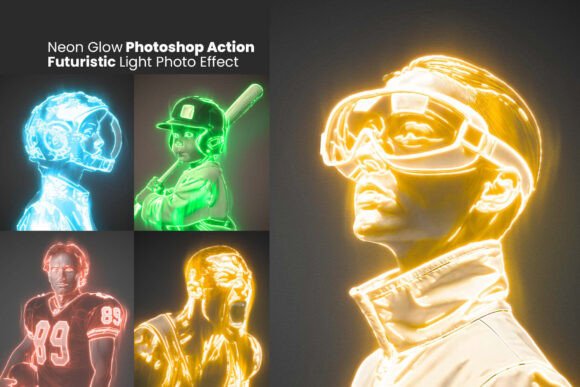
Transform Photos with Neon Glow Photoshop Action
Photoshop users looking to add a futuristic, high-energy vibe to their images often struggle to recreate the look of glowing neon lights and cyberpunk aesthetics. The Neon Glow Photoshop Action solves this by offering a streamlined, one-click solution that transforms ordinary photos into vibrant neon-lit visuals. Whether you're a beginner or a seasoned designer, this tool brings professional-grade effects within easy reach.
What Is the Neon Glow Photoshop Action?
The Neon Glow Photoshop Action is a pre-configured set of commands designed to apply a glowing neon effect to your images with minimal effort. It includes a Photoshop Action file (.ATN), custom brushes (.ABR), and pattern textures (.PAT) that work together to simulate realistic neon lighting. The action is non-destructive, meaning you can tweak and refine the outcome without altering your original photo.
Why Use This Neon Light Effect?
Creating neon-style visuals from scratch can be time-consuming and technically challenging. This action simplifies the process by automating complex steps like edge lighting, color grading, and texture overlay. It's especially useful for those who want to achieve a polished look without spending hours learning advanced Photoshop techniques.
Perfect for a Range of Creative Projects
From personal art pieces to commercial designs, the Neon Glow Photoshop Action is versatile enough to support many use cases. Here are a few practical examples:
- Gaming artwork: Add a glowing effect to character portraits or promotional banners for a sci-fi or cyberpunk theme.
- Poster design: Create eye-catching event flyers or movie posters with a modern neon aesthetic.
- Photography edits: Enhance portrait photos with glowing outlines for a dramatic, stylized look.
- Social media visuals: Make Instagram or TikTok thumbnails stand out with bold neon lighting effects.
- Brand assets: Design futuristic logos or digital banners that reflect a tech-forward identity.
Key Features That Make a Difference
One of the standout features of this Photoshop action is its one-click application, which saves time and reduces the learning curve for new users. But beyond that, it offers several customization options:
- Adjustable glow intensity: Fine-tune how bright or soft the neon effect appears.
- Color customization: Change the neon hue to match your theme or brand palette.
- Built-in brushes and patterns: Use included tools to add realistic flicker effects or textured backgrounds.
- High-resolution output: Designed for 300 DPI clarity, making it suitable for both digital and print use.
- Compatibility: Works with Photoshop CS6 and newer versions, ensuring broad usability across platforms.
How to Get Started with Neon Glow Action
Using the Neon Glow Photoshop Action is straightforward. After downloading and installing the .ATN file, open your photo in Photoshop, load the action, and click “Play.” The action will automatically generate the neon effect on a separate layer, allowing you to make adjustments afterward. For more advanced users, the layered structure gives full control over each visual element.
Who Can Benefit from This Tool?
This action is ideal for a wide range of users, including:
- Photographers: To offer clients a unique post-processing style.
- Graphic designers: For creating bold visuals for branding or advertising.
- Content creators: To enhance thumbnails, banners, and profile images.
- Small business owners: For crafting standout digital assets without hiring a designer.
- Hobbyists: Anyone looking to experiment with digital art and photo manipulation.
Important Considerations Before Use
While the Neon Glow Photoshop Action is user-friendly, there are a few things to keep in mind before diving in:
- Image quality matters: For best results, start with a high-resolution image that has clear outlines and good contrast.
- Layer management: Since the action creates multiple layers, it’s helpful to understand basic Photoshop layer functions.
- Customization is optional: You can use the action as-is or tweak the glow color, brightness, and textures to suit your style.
- Performance impact: High-resolution files with many effects may require more system resources, so be mindful of your computer’s capabilities.
Why This Photoshop Action Stands Out
Unlike many neon-style filters that look artificial or overly saturated, the Neon Glow Photoshop Action delivers a balanced, realistic effect that enhances rather than overwhelms your image. Its combination of brushes, patterns, and editable layers makes it more versatile than simple filter presets. Plus, the inclusion of lifetime free updates ensures that you’ll always have access to improvements and enhancements.
Final Thoughts
If you're looking to give your photos a futuristic edge without spending hours on manual edits, the Neon Glow Photoshop Action is a powerful tool to consider. It brings together convenience, quality, and creative flexibility in a way that appeals to both beginners and professionals. Whether you're designing for fun, personal projects, or client work, this action can help you achieve striking results with minimal effort.