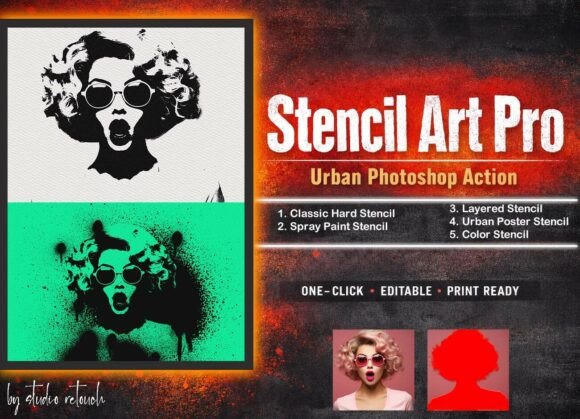
Stencil Art Pro Urban Photoshop Action: Elevating Street-Inspired Design
In the ever-evolving world of digital design, visual storytelling continues to adapt to the aesthetics of modern culture. One trend that has gained significant traction across branding, marketing, and creative industries is the use of street art-inspired visuals. At the forefront of this movement is Stencil Art Pro – Urban Photoshop Action, a comprehensive toolkit that transforms ordinary images into high-impact stencil artwork. Designed for creatives who value efficiency and style, this Photoshop action bridges the gap between analog street culture and digital precision.
What Is Stencil Art Pro Urban Photoshop Action?
Stencil Art Pro is a non-destructive, layered Photoshop action that enables users to create professional stencil effects with minimal effort. Whether you're designing protest posters, album covers, or urban branding materials, this tool delivers five distinct stencil styles: Classic Hard Stencil, Spray Paint Stencil, Layered Stencil, Urban Poster Stencil, and Color Stencil. Each effect is inspired by real-world street art techniques such as spray painting and wheat-pasting, making it ideal for projects that require a bold, contemporary edge.
Why Stencil Effects Matter in Modern Design
The resurgence of stencil-based visuals reflects a broader shift in design preferences. Audiences today are drawn to authenticity, grit, and visual contrast — qualities often associated with urban art forms. In branding and marketing, these aesthetics communicate urgency, creativity, and rebellion against polished perfection. Stencil Art Pro taps into this demand by offering a streamlined way to generate high-contrast, textured visuals that stand out in both print and digital environments.
How Stencil Art Pro Fits Into Current Creative Workflows
Modern design workflows prioritize speed and flexibility without sacrificing quality. Stencil Art Pro supports this need by integrating seamlessly into Photoshop CC versions from CS6 through CC2022. Its non-destructive editing approach allows designers to tweak individual layers and effects long after the initial transformation. This adaptability is especially valuable for professionals working on fast-paced projects like social media campaigns, event posters, or branding mockups.
Practical Setup Instructions
To get the best results from Stencil Art Pro, it's important to start with the right image dimensions. Begin by opening your photo in Photoshop and resizing it using the crop tool. Set the width to 3000px, height to 2000px, and resolution to 72dpi for optimal clarity and performance. Next, create a new layer named “paint” (in lowercase) and use a brush tool to highlight the subject's focal area. Once prepared, simply run the action to apply the stencil effect.
The Evolution of Digital Stencil Art
Stenciling has long been a staple of graffiti and protest art, known for its sharp contrasts and layered textures. With the rise of digital tools, artists and designers have sought ways to replicate these effects without the physical constraints of paint and paper. Stencil Art Pro builds on this evolution by offering a digital solution that maintains the tactile feel of traditional stenciling while enhancing control and repeatability. As creative expectations shift toward more dynamic, textured visuals, tools like Stencil Art Pro become essential for staying relevant.
Real-World Applications for Stencil Art Pro
From album artwork to political posters, the applications of Stencil Art Pro are diverse and practical. Independent musicians can create eye-catching cover art that reflects their edgy sound. Urban brands can use the action to design packaging or promotional materials that align with streetwear aesthetics. Even educators and bloggers can benefit by incorporating stencil visuals into infographics or editorial content to engage younger, design-savvy audiences.
Five Stencil Effects for Different Creative Needs
- Classic Hard Stencil – Ideal for clean, high-contrast visuals with a timeless stencil look.
- Spray Paint Stencil – Simulates the texture and bleed of real spray paint for a raw, street-style finish.
- Layered Stencil – Adds depth and complexity by stacking multiple stencil layers.
- Urban Poster Stencil – Perfect for protest graphics and event posters with a vintage wheat-paste feel.
- Color Stencil – Introduces color variations while maintaining the signature stencil edge.
Design Trends Influencing Stencil Art Popularity
Visual trends often reflect cultural shifts, and stencil art is no exception. The growing interest in analog-inspired digital effects aligns with a broader appreciation for imperfection and craftsmanship. In a world saturated with hyper-realistic visuals, stencil-based designs offer a refreshing alternative that feels tactile and intentional. This shift is evident in the rise of streetwear branding, punk revival in music, and the use of protest imagery in social media campaigns — all of which benefit from the visual language Stencil Art Pro provides.
Who Can Benefit from Stencil Art Pro?
Whether you're a seasoned designer or a hobbyist exploring digital art for the first time, Stencil Art Pro is built to accommodate a wide range of users. Its intuitive interface and layered structure make it accessible for beginners, while its customization options appeal to advanced users who want to fine-tune their output. Entrepreneurs and marketers can quickly generate visuals that align with current design trends, and educators can use the action to teach students about digital effects inspired by real-world art movements.
Technical Compatibility and Ease of Use
One of the key strengths of Stencil Art Pro is its compatibility across multiple Photoshop versions. From CS6 to CC2022, the action has been tested and optimized for stability, ensuring a smooth experience regardless of your software setup. This broad support makes it a reliable choice for professionals who may not always be on the latest software version. Additionally, the inclusion of spray paint brushes and paper textures enhances the realism of each stencil effect, giving users more creative freedom without requiring advanced technical skills.
Final Thoughts on Stencil Art Pro in a Visual-First World
In today’s fast-paced creative landscape, having tools that streamline complex effects is more important than ever. Stencil Art Pro – Urban Photoshop Action offers a compelling solution for those looking to infuse their work with the energy and authenticity of street art. By combining efficiency with artistic depth, it empowers creators to produce high-quality stencil visuals without compromising on customization or control. As visual trends continue to evolve, tools like Stencil Art Pro will remain relevant for anyone looking to stay ahead of the curve while honoring the roots of urban design.