Transform Designs with the Grass Effect Photoshop Action
What Is the Grass Effect Photoshop Action?
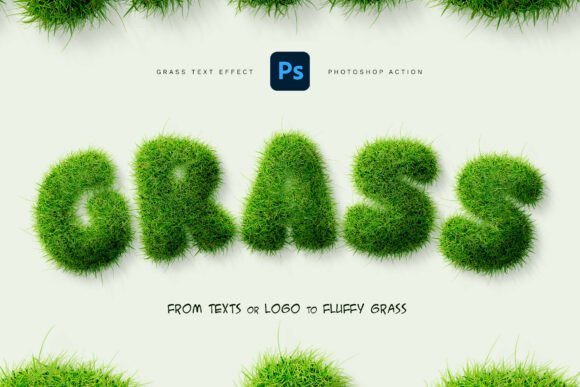
The Grass Effect Photoshop Action is a powerful tool designed to turn any text or logo into a realistic, fluffy grass effect with minimal effort. This Photoshop action is built to simulate a natural, organic look, giving your designs a vibrant, textured appearance that mimics real grass. Whether you're working on branding, posters, or creative typography, this action helps you achieve professional results in seconds.
Key Features That Make It Stand Out
One of the standout features of the Grass Effect Photoshop Action is its ease of use. With just one click, you can apply a complex grass texture to your design elements. But beyond the simplicity, it offers a high level of customization:
- Realistic 3D grass appearance with depth and texture
- Works with both text and vector logos, giving you flexibility
- Adjustable settings for grass color, density, lighting, and shadows
- Non-destructive editing allows for safe experimentation
- Clean, organized layers for easy post-processing
What’s Included in the Package?
When you download the Grass Effect Photoshop Action, you receive a complete toolkit to get started right away:
- .ATN Photoshop Action – ready to install and use instantly
- .ABR Brushes and .PAT Patterns – for additional texture and control
- PSD Template – to help you jump-start your design
- Help File Instructions – guiding you through installation and usage
Who Can Benefit from This Action?
The Grass Effect Photoshop Action is ideal for a wide range of users, from hobbyists to professional designers. Here are some of the main audiences who will find this tool valuable:
- Graphic designers working on nature-themed branding or eco-conscious projects
- Marketing professionals creating promotional materials for outdoor or organic brands
- Logo designers looking to add organic textures to their branding elements
- Illustrators and typographers exploring creative, playful design styles
- Small business owners and DIY creators who want to enhance their visuals without advanced Photoshop skills
Where Can You Use the Grass Effect?
This Photoshop action is versatile and can be applied across a variety of design contexts:
- Logo and headline design – add a fresh, natural look to brand names or titles
- Eco and nature branding – perfect for sustainability-focused businesses or environmental campaigns
- Posters and flyers – create eye-catching visuals that stand out with organic textures
- Kids’ and playful designs – bring a whimsical, fun element to illustrations or packaging
- Creative typography projects – elevate text-based art with realistic grass effects
Real-World Applications and Examples
Let’s look at a few practical examples of how the Grass Effect Photoshop Action can be used in real projects:
- Eco-Friendly Product Packaging – A company launching a line of organic baby products might use grass-textured logos to emphasize their commitment to nature and purity.
- Outdoor Festival Poster – Designers can apply the grass effect to event titles or icons to create a vibrant, earthy aesthetic that matches the theme.
- Children’s Book Cover – Illustrators can use the grass effect on titles or background elements to give a soft, playful look that appeals to young readers.
- Green Energy Campaign – A nonprofit organization promoting clean energy could use grass-textured headlines in their digital ads to reinforce their environmental message.
Strengths of the Grass Effect Photoshop Action
There are several reasons why this action is a must-have for designers:
- Time-saving – instead of manually creating a grass texture, the action automates the process
- High-quality results – delivers a professional, photorealistic finish every time
- Customizable – allows for color changes, shadow adjustments, and texture blending
- Non-destructive workflow – preserves your original design layers for future edits
- Beginner-friendly – no advanced Photoshop knowledge required
Considerations and Limitations
While the Grass Effect Photoshop Action is incredibly versatile, there are a few things to keep in mind before using it:
- Photoshop Required – the action only works within Adobe Photoshop, so users must have the software installed.
- Preview Images Are for Demonstration – fonts and background images used in previews are not included and must be sourced separately.
- Rendering Time – complex designs with many layers may take longer to process depending on your system performance.
- Texture Suitability – while the grass effect is versatile, it may not be appropriate for all design styles or industries.
How to Evaluate If It’s Right for Your Project
Before purchasing or applying the Grass Effect Photoshop Action, consider the following questions to determine if it aligns with your design goals:
- Does your project require a natural or organic aesthetic?
- Are you looking to add texture and depth without spending hours on manual design?
- Do you need a professional result that can be customized to fit your brand colors or style?
- Are you comfortable working in Photoshop, or are you willing to follow the included instructions to learn?
If the answer is “yes” to most of these questions, the Grass Effect Photoshop Action is likely a great fit for your design toolkit.
Getting Started with the Grass Effect Photoshop Action
Once you’ve downloaded and installed the action, getting started is simple:
- Open your design in Photoshop – this can be a text layer, logo, or vector shape.
- Run the Grass Effect Action from your Actions panel.
- Adjust the settings as needed – change the grass color, adjust shadow intensity, or tweak texture density.
- Save or export your final design in your preferred format.
The included PSD template and help file ensure that even beginners can start creating with confidence.
Conclusion: A Must-Have Tool for Creative Designers
The Grass Effect Photoshop Action is more than just a visual effect – it’s a time-saving, professional-grade tool that opens up new creative possibilities. Whether you're designing a logo, a poster, or a playful kids’ illustration, this action helps you achieve stunning results with minimal effort. Its flexibility, ease of use, and high-quality output make it an essential asset for any designer looking to bring organic, nature-inspired textures into their work.
If you're ready to elevate your designs with a realistic, fluffy grass effect, the Grass Effect Photoshop Action is the perfect solution. Try it today and see how it can transform your next project into something truly vibrant and engaging.